



What’s new
Current version: 2026.1
Support topics
Recommended configuration for reservoir modelling
Volsung
Volsung 2026.1
Volsung 2026.1.2 is now available. Customers using Volsung 2026.1 or 2026.1.1 are recommended to upgrade to 2026.1.2
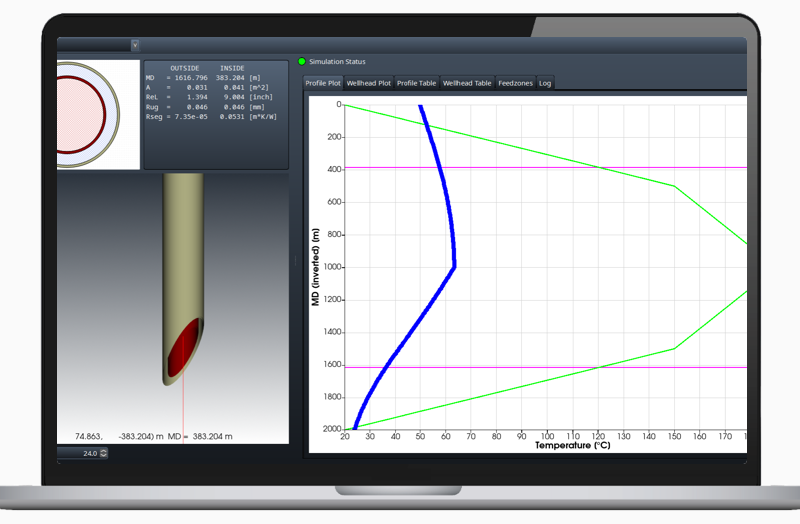
Volsung 2026.1 adds support for modelling coaxial geothermal wells and updates how 3D visualisation controls are accessed and simulation outputs are configured. This release also includes a licensing change and requires Bentley account authentication.
Key highlights:
- Model coaxial geothermal wells, with thermal conductivity varying along the wellbore to support Advanced Geothermal System (AGS) approaches.
- Review results using the Viewer Settings panel including contours, thresholds, and vectors.
- Configure simulation outputs using the Output Controls dialog, providing centralised control over output settings.
- Use additional modelling and visualisation options, including a spider web grid and 3D water‑table display.
- Access Volsung with a Bentley account using Bentley Connection Client on Windows or browser-based sign-in on Linux, learn more.
View the full Volsung 2026.1 release notes.
Help and Support
Browse by topic or resource type
Help

Software downloads

Seequent ID and account management
Subscriptions, licenses and billing

IT Administrators
Product help
Support requests
Managing your support requests
Here at Seequent we are committed to seeing the possibilities and anticipating what is next. As such, we are continuously evolving to better serve you. You can now actively monitor and manage your support request via MySeequent using your unique Seequent ID.
Getting started
Get setup with your Volsung or Gudrun license, download example projects and watch tutorials.
Research papers
Access research papers on geothermal modelling with Volsung.
Volsung system requirements
Minimum requirements
Volsung can be installed on 64-bit Windows 11 or Ubuntu 24.04 Linux operating systems.
Minimum hardware requirements
- Modern graphics card with OpenGL 2.1 support (OpenGL 4.0 recommended)
- 8 GB RAM
- 2 GB of free disk space for software installation
- Additional storage for simulation data
These minimum specifications are suitable for running wellbore models and small reservoir models. Larger or more complex simulations will benefit from additional computing resources, as outlined below.
Recommended configuration for reservoir modelling
The recommended hardware configuration depends on the operating system, CPU, GPU, RAM, and storage. Volsung uses:
- CPU parallelisation for surface network and reservoir thermodynamic calculations
- GPU or CPU parallelisation to solve the reservoir simulation linear system
Operating system
Historically, GPU acceleration in Volsung has been faster under Linux compared with Windows (Franz et al 2019 [https://files.seequent.com/PDFs/Franz_2019.pdf]). However, optimisations to the Volsung linear solvers in 2026 have reduced this performance gap. While Linux can still give the fastest performance, Windows is suitable for real-world reservoir modelling applications.
Volsung supports remote execution on dedicated workstations or cloud-based systems. This allows users to build and analyse models on a local Windows workstation while running simulations on a remote Linux system.
Accessing Volsung via Windows Remote Desktop (RDP) can reduce GPU solver performance Please contact Seequent support if you are considering using remote access.
CPU
Surface network and reservoir thermodynamics calculations are executed in parallel across CPU cores.
Additional CPU cores can further improve performance for:
- Coupled reservoir and wellbore simulations
- Models with large numbers of wells (for example, more than 50 coupled production wells)
- Complex surface network models
The reservoir simulation linear system can be solved using either GPUs or CPUs. GPU-based solvers generally provide the highest performance. If CPU-based solvers are used, the number of CPU cores will affect the time taken to solve the linear system.
We recommend:
- Baseline models: 8 physical CPU cores
- Complex surface network models or large reservoir models: 12 physical CPU cores
GPU
An NVIDIA GPU is required to use GPU acceleration for reservoir simulation.
Solver performance scales strongly with GPU memory bandwidth (Franz et al., 2019). We recommend:
- Baseline models: 600 GB/s memory bandwidth
- Large reservoir models: Greater than 1,000 GB/s memory bandwidth
Higher-bandwidth GPUs generally provide faster simulation runtimes.
Memory (RAM)
We recommend:
- Baseline reservoir models: 16 GB RAM
- Large field-scale models: 32 GB RAM or more
Storage
We recommend a high-speed NVMe solid-state drive (SSD) with 500 GB to 1 TB of available storage.
Typical recommended workstation configuration
- Windows 11 or Ubuntu 24.04
- CPU with 8 physical cores
- NVIDIA RTX 4080 / RTX 5070-class GPU or better
- 32 GB RAM
- 1 TB NVMe SSD
This is a suitable starting configuration for many geothermal reservoir modelling projects. Larger or more complex models may require additional computing resources.
Open source library
Some of the libraries which Volsung is built on require us to make their source code available to users, for example under an LGPL license. Most users will never require these files. Use the links below to download the source code of the libraries:
Please contact us if you wish to alter libraries according to their respective license conditions and we will support you in your efforts.
Linux
Linux (Ubuntu and its Derivative Distros)
Note: If you’re new to Linux and want to try out Volsung’s exceptional NVIDIA GPU acceleration we recommend you try out the Linux Mint distribution with the Cinnamon window manager. You can test run Linux by installing the system on a second hard drive using dual boot or you can even run it on a large USB flash drive. The license files which we distribute will work under both Windows and Linux.
SNAP Installation for Linux
For non-Ubuntu based Linux distributions you can install Volsung directly from the SNAP store. Please follow the instructions there.
One small drawback of using Volsung as a SNAP installation is that it does not fully integrate into your desktop environment; i.e. you need to manually set the file associations so that double-clicking a file will open the corresponding Volsung application. How you do this depends on the desktop environment you are using; if you are using open desktop you can use the following scripts:
- /snap/volsung/current/bin/install-icons
- /snap/volsung/current/bin/install-mime-types
Note SNAP installations are maintenance free and will upgrade automatically when a newer version of Volsung becomes available.
For the installation first ensure that your package repositories are up-to-date:
- sudo apt update
- sudo apt upgrade
- sudo apt install libxcb-xinerama0 dbus-x11
If you plan to use GPU accelerated computing please correctly install your NVIDIA GPU first and ensure that the correct NVIDIA driver is installed on your system. If you install a GPU later on you may need to reinstall Volsung.
Next run the downloaded installer binary from the command line:
- chmod +x ./volsung-online-installer
- sudo ./volsung-online-installer
Note: if you do not have all required system packages installed then a terminal will pop up to install these missing packages.
Volsung Supported Data Types & Formats
For Volsung version 2026.1
Access the latest versions of Seequent products & tools here.
Inputs
- Wells
- Meshes/surfaces
- Points
- Image sections
- Flow simulation grid
- Volsung flow model
- Geological model closed volumes
File Types (Import)
Well Data
- Leapfrog Energy directional well plan (.csv)
Meshes/Surfaces
- GOCAD Tsurf meshes
Points
- x,y,z value (.csv)
Image sections
- jpeg, png, geotiff, geojson
Flow simulation grid
- Mulgrid geometry file
- VTK unstructured grid (.vtu)
TOUGH flow model
- AUTOUGH2 .DAT with Mulgrid geometry file
- TOUGH2.DAT (varying compatibility depending on version and EOS)
Geological model closed volumes
- Leapfrog (LFM)
Outputs
- Wells
- Meshes/Surfaces
- Points
- Flow simulation outputs
- Reports
File Types (Exports)
Well Data
- Any table to csv file
Meshes/Surfaces
- VTK format
Points
- x,y,z value csv
Flow simulation outputs
- HDF5
Reports
- PDF reports