



Our understanding of ground conditions evolves with the project, so geotechnical design teams need a reliable way to work with the latest information.
Infrastructure projects are complex, and the ground beneath them represents a significant variable. Yet, despite advances in digital delivery, civil design and geotechnical teams can still operate in separate workflows.
Civil teams often face time-consuming manual processes when working with geotechnical data critical to their designs. This might include spending hours importing static files, only to find out the interpretations were updated the very next day.
It is time to move beyond simple data transfers. By connecting dynamically to the master geotechnical database, engineering teams can better manage project risk and keep design decisions grounded in current, trusted information.
Seequent’s OpenGround Civil 3D Extension brings that connection directly into Civil 3D, giving civil design teams access to reliable geotechnical data within their design environment.
Here’s a deep dive into how a connected approach transforms the workflow for geotechnical leads, civil engineers, and digital delivery managers.
1.Data governance: Establishing a single source of truth
In a traditional, disconnected workflow, sharing ground data often means exporting a cvs, ags, or excel file to the civil design team. The moment that file is exported, it risks becoming outdated. If modifications are made to adapt it, teams can end up with conflicting versions of the truth.
For BIM and digital delivery managers, managing these fragmented data pipelines can be highly challenging, often relying on manual file conversions and bespoke scripts that need constant updating when project parameters change.
For geotechnical leads, disconnected data makes it difficult to maintain oversight. Ensuring civil teams use validated and current data for grading or alignment decisions is essential for effective risk management.
The dynamic solution:
An integration like the OpenGround Civil 3D Extension helps streamline this process by establishing a direct, secure link to the master database.
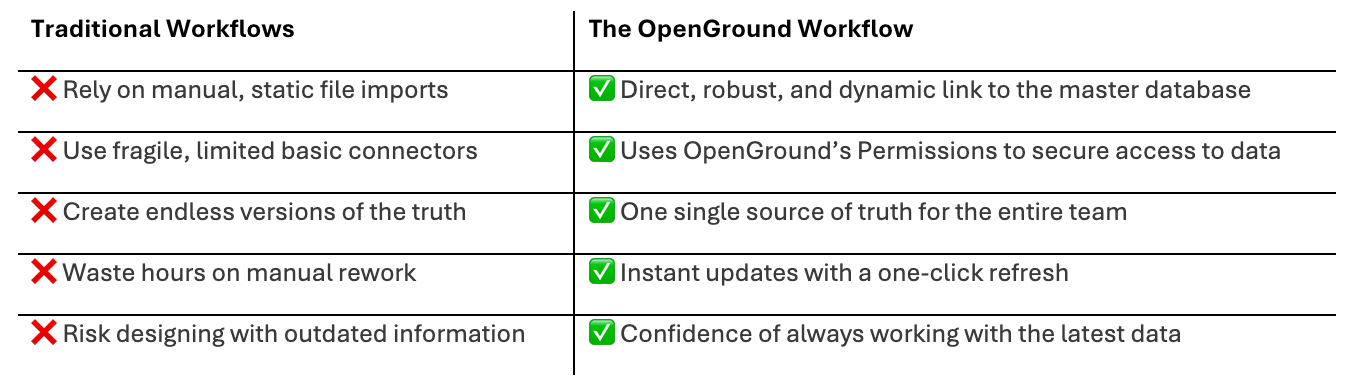
2. Going beyond basic pins: Streaming rich geotechnical data
Basic tools often limit teams to importing borehole coordinates (pins on a map) and a few text attributes. However, a simple location point does not give project contributors the full context of soil behaviour 20 metres below the surface.
To make confident alignment and foundation decisions, civil teams need a more complete picture.
The dynamic solution:
A robust database connection allows you to connect to your OpenGround cloud project and stream comprehensive geotechnical data directly into the Civil 3D environment. This deep visibility changes how teams assess site conditions.
- Detailed lithology: Visualise soil and rock descriptions directly along your alignment.
- In situ and lab results: Bring critical testing data (such as SPT blow counts or moisture content) into the civil model to better understand ground characteristics.
- Groundwater data: Overlay water table levels against proposed drainage networks or deep excavations.

Accelerate your workflow. Watch how easily you can generate dynamic profiles and refine subsurface strata surfaces directly in Civil 3D.
3. Create detailed profiles directly from interpretations
Historically, teams have tried to generate 3D geological surfaces within design environments. However, standard surface generation can sometimes be challenging when dealing with complex geology like lenses, faults, or folded strata.
Adapting complex geology into basic surfaces can result in hours of manual drafting. Generating clear, accurate cross-sections and profiles often provides much more practical value.
The dynamic solution:
Instead of relying solely on standard surface generation, a dynamic connection allows teams to draw comprehensive geological profiles directly from the interpretations stored in the master database.
When your geotechnical team builds an interpretation in OpenGround, the civil design team can generate a detailed profile view along their exact road alignment or pipe network in Civil 3D. This connected workflow reduces manual drafting time and provides a clear cross-section of the site, ensuring that elements like road cuttings and bridge abutments are designed with an accurate understanding of the subsurface.
4. Instant updates with a one-click refresh
Design is an iterative process. Site investigations often continue alongside civil design, with new boreholes drilled and lab results arriving as the project progresses. In a manual workflow, updating the civil model with this new data often means repeating the import process, which can disrupt existing profiles and lead to manual rework.
The dynamic solution:
With a dynamic link, updates are streamlined while leaving you in complete control. When the geotechnical team logs a new borehole or refines an Interpretation in OpenGround, the civil design team decides exactly when to incorporate those changes.
A simple one-click refresh instantly syncs the Civil 3D model on your terms, ensuring you can access the latest information without any unexpected disruptions to your workflow.

See the ground clearly in your design environment. Watch how OpenGround dynamically updates your Civil 3D models the moment new investigation data becomes available.
Discover what true integration looks like
See how a direct connection to your geotechnical database goes beyond basic connectors or file-based workflows. Reduce manual rework and design with the confidence of always working with current, trusted data.
Watch our technical session to discover how the OpenGround Civil 3D Extension provides a dynamic link to your single source of truth. You will learn how to:
- Move beyond static imports and work with a dynamic geotechnical model that you synchronise whenever you choose.
- Leverage rich data to manage project risk and design with confidence.
- Automatically draw comprehensive geotechnical profiles from your interpretations, saving valuable design hours.