


Software downloads
Get the latest versions of all Seequent tools and software.
Download the latest software
Find answers to your technical questions and get the most out of your product.
Imago is a cloud-based solution for managing, cataloguing, and visualising large volumes of geoscientific imagery. Imago includes integrated extensions for image capture in the core shed, field image collection through mobile devices, and a suite of tools and APIs for integrating imagery.

Imago has minimum system requirements to ensure the best experience while using the product. To ensure you have the correct setup, we have provided an overview of the minimum and recommended requirements to operate your Imago subscription.
| Minimum | Recommended | |
|---|---|---|
| Web browser | The current version of Chrome, Edge, Safari, or Firefox | Chrome |
| Display | 1280 x 720 on 14” display | 2160 x 3840 (4k) on 32” display |
| Controller | Trackpad, Mouse, Touch Screen | High-precision mouse with wheel |
| Operating system | Windows, macOS, Android, iOS | Windows, macOS, Android, iOS |
| RAM | 4 GB | 16 GB or better |
| Internet Connection | 10 Mbps download, 1 Mbps upload, latency 150ms | 150ms200 Mbps download, 20 Mbps upload, latency 20ms or better |
| Minimum | Recommended | |
|---|---|---|
| Operating system | Android 13 or newer | Android 15 |
| Model | Samsung A13 or equivalent, Google Pixel 4 or equivalent | Samsung XCover 6 Pro, Google Pixel 7 or better |
| Storage | 32 GB | 64 GB or better |
| Internet connection | Wi-Fi | Wi-Fi + 5G mobile network or better |
| Minimum | Recommended | |
|---|---|---|
| Operating system | iOS 16 or newer, iPadOS 16 or newer | iOS 18, iPadOS 18 |
| Model | Apple iPhone 11, Apple iPad Air 4th generation | Apple iPhone 16, Apple iPad Pro 11″ 4th generation |
| Storage | 64 GB | 128 GB or better |
| Internet Connection | WIFI + 4G mobile network | Wi-Fi + 5G mobile network |
| Minimum | Recommended | |
|---|---|---|
| Operating system | Microsoft Windows (64-bit) 11 | Microsoft Windows (64-bit) 11 |
| Storage | Hard disk (HDD), 250 GB capacity, 25 GB free space | Solid-state drive (SSD), 1 TB or larger capacity, 100 GB free space |
| Memory | 4 GB RAM | 16 GB RAM |
| Display | 1280 × 720 on 14″ display | 1920 × 1080 on 17″ display |
| Processor | Intel Core i3, i5, i7, or i9 CPU, 7th generation or later. AMD Ryzen processor, 1st generation or newer | ntel Core i3, i5, i7, or i9 CPU, 10th generation or later. AMD Ryzen processor, 3rd generation or newer |
| Internet connection | 10 Mbps download, 1 Mbps upload, latency 150ms | 200 Mbps download, 20 Mbps upload, latency 20 ms or better |
| Minimum | Recommended | |
|---|---|---|
| Operating system | Microsoft Windows (64-bit) 11 | Microsoft Windows (64-bit) 11 |
| Storage | Hard Disk (HDD) 250 GB capacity, 25 GB free space | Solid-State (SSD) 1 TB or larger capacity, 100 GB free space |
| Memory | 4 GB RAM | 16 GB RAM |
| Display | 1280 x 720 on 14" Display | 1920 x 1080 on 17” Display |
| Processor | Intel Core i3, i5, i7, or i9 CPU, 7th generation or later. AMD Ryzen processor, 1st generation or newer | Intel Core i3, i5, i7, or i9 CPU, 10th generation or later. AMD Ryzen processor, 3rd generation or newer |
| Internet connection | 10 Mbps download, 1 Mbps upload, latency 150 ms | 200 Mbps download, 20 Mbps upload, latency 20ms or better |
| Canon cameras | Canon EOS Kiss X10i / EOS Rebel T8i / EOS 850D | Canon EOS R6 Mark II, Canon EOS R8, Canon EOS R50, Canon EOS R7, Canon EOS R10, Canon EOS R3, Canon EOS-1D X Mark III, Canon EOS-1DS Mark III, Canon EOS Kiss X10i / EOS Rebel T8i / EOS 850D, Canon EOS R5, Canon EOS R6, Canon EOS 250D, Canon EOS 90D, Canon EOS Kiss X10 / EOS Rebel SL3 / EOS 250D / EOS 200D II, Canon EOS R, Canon EOS RP, Canon EOS Kiss X90 / EOS Rebel T7 / EOS 2000D / EOS 1500D, Canon EOS Rebel T100 / EOS 4000D / EOS 3000D, Canon EOS 1500D, Canon EOS 6D Mark II, Canon EOS 9000D / EOS 77D, Canon EOS Kiss X9 / EOS Rebel SL2 / EOS 200D, Canon EOS Kiss X9i / EOS Rebel T7i / EOS 800D, Canon Rebel T7i, Canon EOS-1D X Mark II, Canon EOS 1300D, Canon EOS 5D Mark IV, Canon EOS 80D, Canon EOS Kiss X80 / EOS Rebel T6 / EOS 1300D, Canon EOS 5DS, Canon EOS 5DS(R), Canon EOS 760D, Canon EOS 8000D / EOS Rebel T6s / EOS 760D, Canon EOS Kiss X8i / EOS Rebel T6i / EOS 750D, Canon Rebel T6i, Canon EOS R1, Canon EOS R5 Mark II |
| Nikon cameras | Nikon Z9, Nikon Z6 II, Nikon Z50, Nikon Z5, Nikon Z6, Nikon Z7, Nikon Z7 II, Nikon Zfc, Nikon Z30, Nikon D5600, Nikon D850, Nikon D3400, Nikon D5, Nikon D500, Nikon D5500, Nikon D810A, Nikon D810, Nikon D780 | Nikon Z9 Nikon Z6 II |
| Sony cameras | Sony ILCE-7RM5, Sony ILCE-7M4, Sony ILCE-1, Sony ILCE-7RM4A, Sony ILCE-7SM3, Sony ILCE-7RM4, Sony ILCE-9M2, Sony ILCE-6700, Sony ILCE-7CR, Sony ILCE-7CM2, Sony ILCE-9M3, Sony ILX-LR1 | Sony ILCE-7RM5 Sony ILCE-7RM4A |
The Imago subscription setup guide describes the process to follow once you have received your Imago subscription.
Before getting started, it’s worthwhile getting familiar with how information is organised in Imago.
Information about the Imago data hierarchy, using the Imago Portal, how to access and manage your users, and how you can begin capturing images can be found within the subscription setup guide.
For customers using Imago’s Data Migration services, you can transfer migration data sets to Seequent with this form.
Note: Seequent uses ShareFile for bulk data transfers.
Imago software helps you capture and manage your core tray images in a structured manner. Included is the Imago Capture X software which turns your camera into a robust photography station, enabling you to take consistent, high-quality images that preserve your drilling investment.
Choosing a good hardware setup for your capture station requires careful consideration, this guide will help you understand how to select the optimal camera setup.
Please note that Seequent can assist with running Imago software at your capture station, however we are not liable for your camera and hardware decisions. When considering which camera is best for you, we recommend consulting with a hardware partner.
Just want to get started? We have a hardware selection flow chart which will help you make the right hardware selection for your core shed.
View the hardware selection flowchart ›
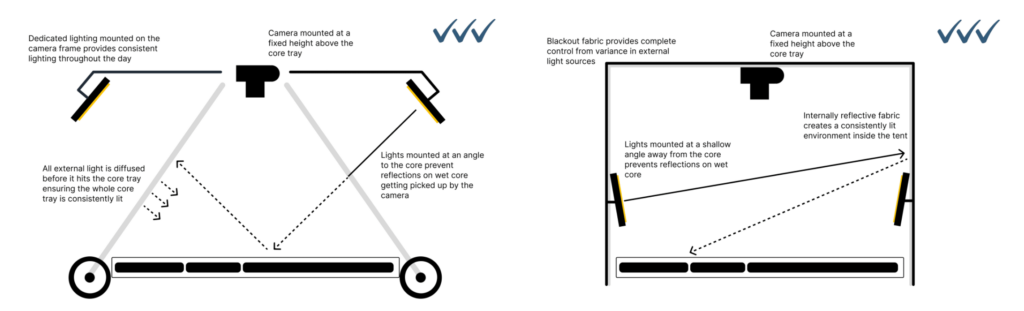
With your capture station in place, the next step is to select a camera. A good camera, paired with a quality lens and Imago Capture X software, can make a significant difference to image quality. Camera selection will largely depend on your budget and requirements.
There are three key considerations when selecting a camera:
Imago Capture X software connects to most modern Mirrorless and DSLR cameras available off-the-shelf from Sony, Canon and Nikon. For full camera compatibility see the Imago System Requirements.
Whilst selecting a lens might seem trivial, using the correct lens can make a big difference to the quality of your images. Our recommendation is to pair your camera with a high-quality Prime lens – this means not using the lens that probably came in the box with your camera.
With the camera mounted at a fixed height above core trays a Prime lens provides the truest view of your core trays. Other types of lenses such as a Zoom lens whilst offering flexibility in your setup can lead to unwanted distortion and fish-eye effects. Zoom lenses may be good for capturing chip trays or other generic images but are not recommended for core tray photographs with a good capture station setup.
Our lens: recommendations
For most core tray image setups with the camera mounted approximately 1m above the core tray we recommend a 28mm Prime lens. If purchasing an aftermarket lens, ensure that the mount is compatible with your camera body.
The most important piece to the hardware setup is getting your image capture station right. With a good capture station setup, reliably capturing high-quality images is easy. Seequent recommends working with one of our hardware partners who can help you setup your core shed for capturing amazing core tray images. DIY setups can still produce good results with some careful consideration.
When designing a capture station a good starting point is asking:
Seequent provides guidance on setting up imaging stations and rigs based on your requirements. We have highlighted two pre-built rigs from Discoverer.
While choosing the right camera is important, correct setup is equally critical to image quality. Even the right equipment can produce low-resolution images if it is incorrectly configured. We recommend carefully considering your complete capture station setup.
CoreSafe Core Solutions supplies core trays and the CASPER core photography system to the exploration industry worldwide.
CASPER is a mobile core tray photography system designed to bring the camera to the core. Fitted wheels allow it to move along roller racking while the camera, PC, and light shroud remain configured and ready to use.
The Table Top CASPER solution operates in a similar way to the roller table version but does not require wheel heights to be matched to the railings and V-channel of the roller table.
Visit the Core Solutions website ›
Westernex supplies mining and exploration products worldwide. Its range includes core trays, core tray photography accessories, core saws, sample bags, marking paint, and geological tools.
Westernex also sources difficult-to-find products and parts for customers through its supplier network.
Imren Sondaj Makine designs, manufactures, and supplies core drilling equipment. Its products are distributed through a network of distributors and industry partners.
Their products include:
Visit the Imren Sondaj Makine website ›
Discoverer is an Australian-based geological supplies company providing products for drilling programmes worldwide.
Discoverer offers the following hardware options for your Imago setup:
Imago has several different modules available to use with your subscription.
Grow your geoscience knowledge, connect with peers, and refresh your skills
Discover new opportunities, connect with peers, and share insights and best practices with others in your field.
Visit Seequent CommunityGet started fast or upskill whilst working with our onboarding and advanced free eLearning courses.
Visit Seequent Learning CentreFind answers to your technical questions and get the most out of your product, with our in-depth product help information.
Visit Seequent Help